
F.A.Q.
Read this before asking for support.
Section titled “Read this before asking for support.”Q: How do I change the ‘M’ (menu toggle) key to ‘some other key’?
Section titled “Q: How do I change the ‘M’ (menu toggle) key to ‘some other key’?”A: Each player can rebind this themselves in FiveM’s key binding settings, so there is nothing to configure server side. Open the pause menu (
ESC) → Settings → Key Bindings, scroll down to the FiveM section, and set “vMenu Toggle Button” to whatever key you like. The noclip toggle (“vMenu NoClip Toggle Button”) can be rebound in the same place. Because these are per-player keybinds, everyone can choose their own key without affecting anyone else.
Q: How do I make this menu admin only?
Section titled “Q: How do I make this menu admin only?”A: Set the
vmenu_menu_staff_onlyconvar totrue(see the configuration page) and give your staff members thevMenu.Stafface.
Q: How do I change the name of my addon car in vMenu?
Section titled “Q: How do I change the name of my addon car in vMenu?”A: Go to this page.
Q: I installed vMenu but I only see the Misc settings and About menu.
Section titled “Q: I installed vMenu but I only see the Misc settings and About menu.”A: This usually means vMenu is not fully set up yet, which is common when you are still using the default permissions file. Please take a look at the installation instructions, they are quick to follow. Most likely the permissions.cfg is not in the correct location, or the correct
execline for your setup was not added ABOVE thestart vMenuline. You may also have edited the permissions.cfg and accidentally changed which menus players can access, so please double check it and compare it to the default permissions.cfg. The permissions page explains how to put one together from scratch.
Q: When I install vMenu the sky starts flickering.
Section titled “Q: When I install vMenu the sky starts flickering.”A: This usually happens when more than one weather and/or time (sync) script is running at once (for example vSync). Disable the other scripts and it should be fine. If you would rather use another script for weather and time, you can disable vMenu’s weather and time sync options using the convars (explained on the Configuration Options page). If you are not running multiple time or weather scripts, a graphics mod is often the cause, so try removing it. vMenu’s weather and time options work well for the vast majority of users once other time and weather scripts and graphics mods have been removed.
Q: The permissions.cfg is not being executed, or my changes are not being saved.
Section titled “Q: The permissions.cfg is not being executed, or my changes are not being saved.”A: vMenu does not read the permissions.cfg on its own. You are responsible for executing this file by adding the
exec <path_to_permissions.cfg>command in your server.cfg before starting vMenu. Please make sure it is being executed. If you see a message in the server console likeNo such config file: permissions.cfg, then the permissions.cfg is not in the correct folder, or yourexeccommand is pointing to the wrong file path.
Q: How do I set the default voice proximity?
Section titled “Q: How do I set the default voice proximity?”A: Set the
vmenu_override_voicechat_default_rangeconvar to the range (in meters) you want players to start with, or leave it at0.0to use each player’s own saved preference. See the configuration page for details. Note that this only changes the default: players can still pick their own proximity in the Voice Chat Options menu afterwards. If you do not want them to change it at all, remove the voice chat permissions so vMenu does not touch any voice chat settings.
Q: How do I disable voice chat?
Section titled “Q: How do I disable voice chat?”A: Simply remove all voice chat permissions from everyone, that will stop vMenu from touching any voice chat settings.
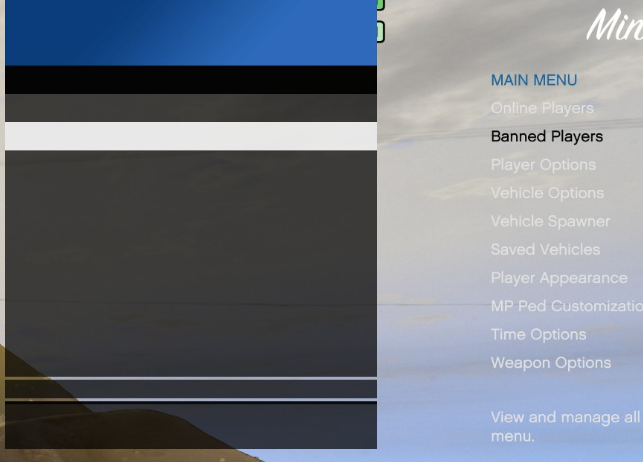
Q: Help, MenuAPI / vMenu v2.1.0 doesn’t work with ultra wide monitors.
Section titled “Q: Help, MenuAPI / vMenu v2.1.0 doesn’t work with ultra wide monitors.”A: Your menu probably looks something like this:
To fix this, either:
- Set your aspect ratio to 16:9 or below
- Don’t use windowed mode (use borderless or fullscreen)
Or:
- Left-align the menu (misc settings > disable ‘right align menu’). This one cannot be fixed, since it is a GTA issue.
Q: Where are vMenu’s vehicles, peds, preferences etc. saved?
Section titled “Q: Where are vMenu’s vehicles, peds, preferences etc. saved?”A: They are saved on the client’s computer, in the following folder:
%appdata%\CitizenFX\kvs\. Please note that you should not edit these files unless you know what you are doing. No support is provided for this, since it is a FiveM feature rather than a vMenu feature.
Q: Can you add database support for permissions/bans/whatever?
Section titled “Q: Can you add database support for permissions/bans/whatever?”A: It is technically possible, but I have decided not to add built in database support for this.
Q: How can I ban someone that’s offline?
Section titled “Q: How can I ban someone that’s offline?”A: This is not supported. The
vmenuserver banconsole command only works on players who are currently online. Bans are stored in FXServer’s own server-side storage, not in abans.jsonfile like older vMenu versions did, so there is no file you can edit while the server is offline.
Q: When I install vMenu everyone has godmode / pvp is disabled!
Section titled “Q: When I install vMenu everyone has godmode / pvp is disabled!”A: Set the
vmenu_pvp_modeconvar to1to enable PVP (friendly fire) for everyone. The available modes are0(do nothing and leave PVP as it is),1(enable PVP for everyone) and2(disable PVP for everyone), and they are explained on the configuration page. You do not need a separate PVP resource for this.
Q: How do I get different identifiers for my users / how do I get the ‘FiveM License’?
Section titled “Q: How do I get different identifiers for my users / how do I get the ‘FiveM License’?”A: Install ‘WhatsMyId’ on your server, and let them join it.
Q: vMenu doesn’t work.
Section titled “Q: vMenu doesn’t work.”A: vMenu is working for many thousands of servers, so the setup is most likely the cause. Please read through the documentation carefully, since most issues come down to a small configuration step that was missed. If you have gone through everything and it still does not work for you, feel free to ask for help on the forum topic.
Q: vMenu version x is buggy, I reverted to some older version.
Section titled “Q: vMenu version x is buggy, I reverted to some older version.”A: Without details it is not possible to investigate. Please provide as much information as you can so the problem can be looked into. Reverting to an older version also means your players miss out on the latest features, fixes, and performance improvements, so it is best to report the specific issue instead. If you can share what is going wrong, it is much easier to help.
Q: Where can I find the beta/dev/pre-release builds?
Section titled “Q: Where can I find the beta/dev/pre-release builds?”A: Beta/pre-release builds are published on the GitHub releases page — look for the versions marked as “Pre-release”. These can contain bugs, so be careful when using them. Please do not put a pre-release build on your live server unless you know what you are doing and you have tested it to make sure there are no bugs.
Q: vMenu doesn’t work on any server I join.
Section titled “Q: vMenu doesn’t work on any server I join.”A: This can be caused by a lot of things. Try to re-install both GTA V and FiveM first, since it is usually a corrupted DLL file somewhere in your GTA V installation or in your FiveM cache files. If it still does not work and you need help, ask on the forum topic and someone from the community may be able to help you. Please provide a client log (
<your fivem folder>\FiveM Application Data\CitizenFX.log) in that case.
Q: How do I allow players to spawn saved vehicles but not use the vehicle spawner menu.
Section titled “Q: How do I allow players to spawn saved vehicles but not use the vehicle spawner menu.”A: Give them access to all
vMenu.VehicleSpawner.<category>categories that you want, then give them full access to thevMenu.SavedVehicles.<x>submenu. Just don’t give them thevMenu.VehicleSpawner.Menupermission and you’ll be all set.
Q: My question is not listed here?
Section titled “Q: My question is not listed here?”A: Please check the forum topic, since your question may already have been answered there. You can use CTRL + F to search within that topic.
Please take a moment to read through these docs before asking for help, since most questions are already answered here. It really does make it easier to help you.
Appreciate my work?
Section titled “Appreciate my work?”Consider supporting me on Patreon!
1-click installation with Zap Hosting
Section titled “1-click installation with Zap Hosting” Zap Hosting provides a simple 1 click installation method for vMenu! Click this link to get a Zap server and use code
 Vespura-a-3715 at checkout for 20% off your purchase!